
Expense & budget manager
Expense Tracker App to Take Control of Your Budget
Track daily expenses and income, plan your monthly budget and see where your money goes – all in one simple app.
About the app
Your Money, Organized.
Expense and Budget Management is an expense tracker app and budget planner that keeps your everyday money in one place. Record what you spend and earn, sort it into categories, plan monthly budgets and review clear summaries whenever you need them.
- 13 ready-made categories for expenses and income, plus your own
- 6 payment methods: cash, card, UPI, bank transfer, wallet and other
- 7 currencies, so you can track expenses in ₹ INR, $ USD, € EUR, £ GBP and more
- 4 app languages: English, Hindi (हिंदी), Gujarati (ગુજરાતી) and Marathi (मराठी)
Features
Everything You Need to Track Expenses and Budgets
Focused tools to track daily spending, plan monthly budgets and review your money.
-
Expense & income tracking
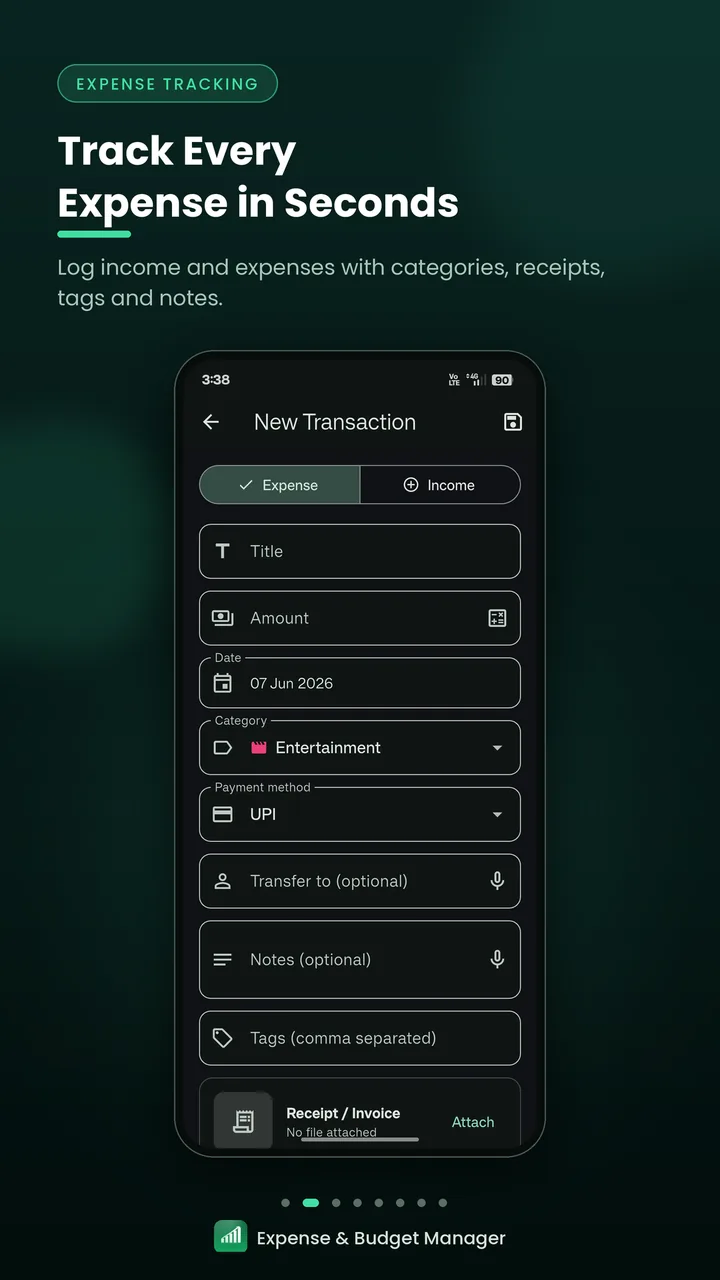
Log daily expenses and income with a title, amount, date, category and payment method. Attach a receipt or invoice, and add notes and tags.
Tap + to add
-
Monthly budget planner
Set an overall monthly budget, budgets for individual categories, or both – and follow how much of each you've used.
Budget tab
-
Reports & charts
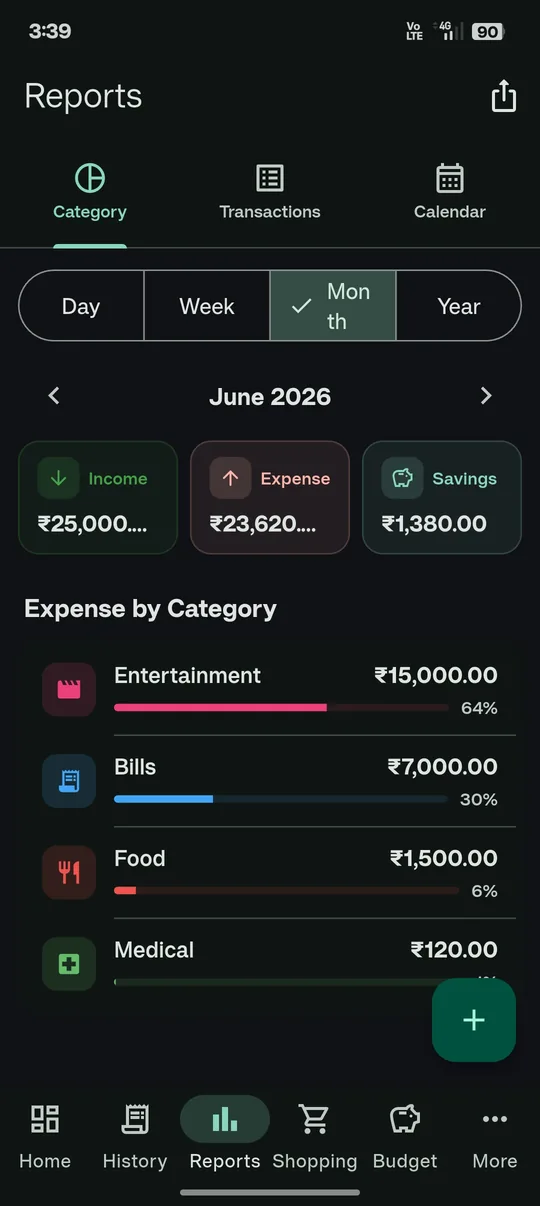
View income, expenses and savings by day, week, month or year, with a category breakdown and expense reports you can export as PDF or CSV.
Reports tab
-
Transaction history
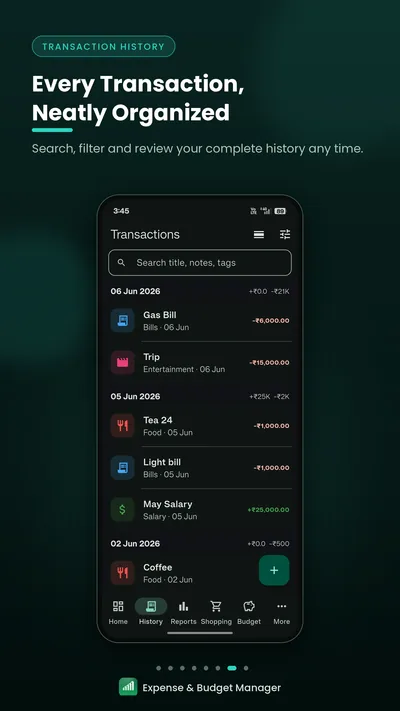
Search by title, notes or tags, filter by type, date, category or amount, and group entries by day or month.
History tab
-
Custom categories
Start with 13 ready-made expense and income categories, or create your own with an icon and color.
More › Categories
-
Recurring & due payments
Set up recurring expenses such as rent, loan EMIs or subscriptions, and keep track of borrowed money and pending bills.
More › Recurring · Due Payments
Also included
- Shopping lists with reminders
- Daily reminder to log expenses
- Voice input
- Light & dark themes
- Google Drive backup
Inside the app
Explore the Expense Tracker, Screen by Screen
Real screens from the Android app. Choose one to take a closer look.


Your month at a glance
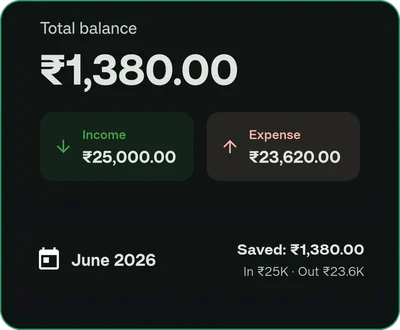
- Total balance with income and expenses
- This month's savings, money in and money out
- Budget progress for the current month
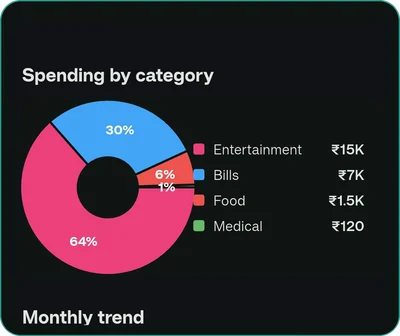
- Spending by category and a 12-month trend
- Your most recent transactions
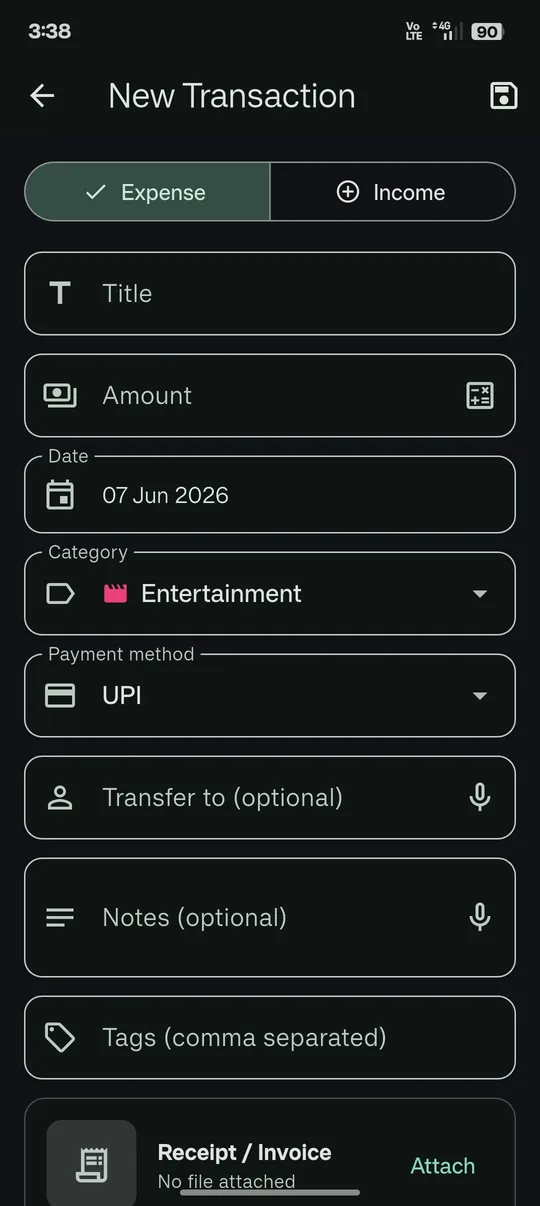
Record expenses and income
- Switch between Expense and Income
- Title, amount, date and category
- Cash, card, UPI, bank transfer, wallet or other
- Notes, tags and a receipt or invoice
- Voice input for notes
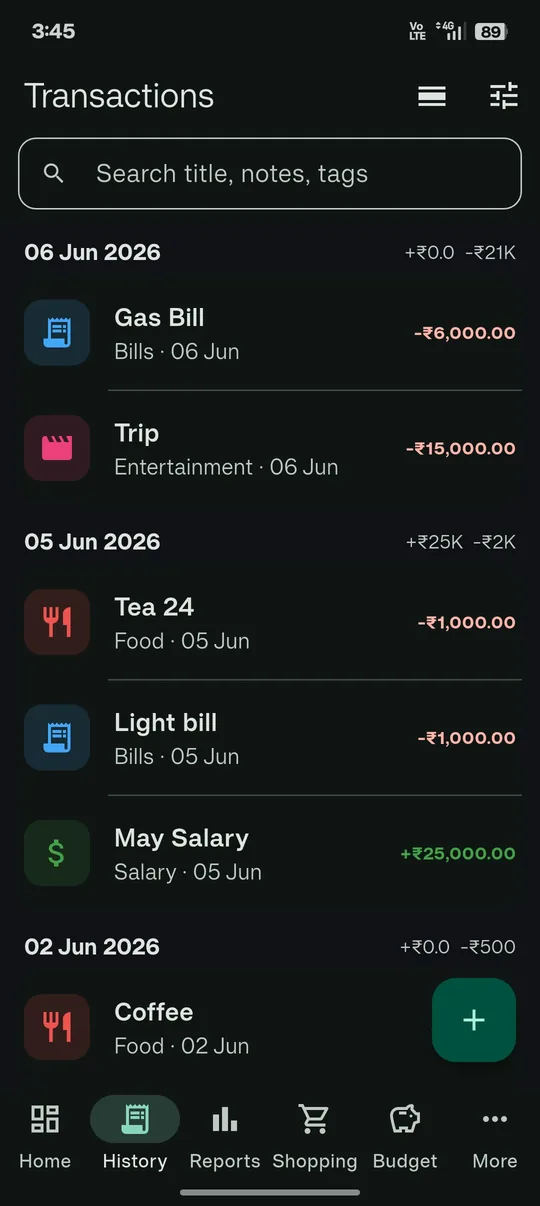
Find any transaction
- Search titles, notes and tags
- Filter by type, date range, category and amount
- Group entries by date or by month
- Daily totals for money in and out
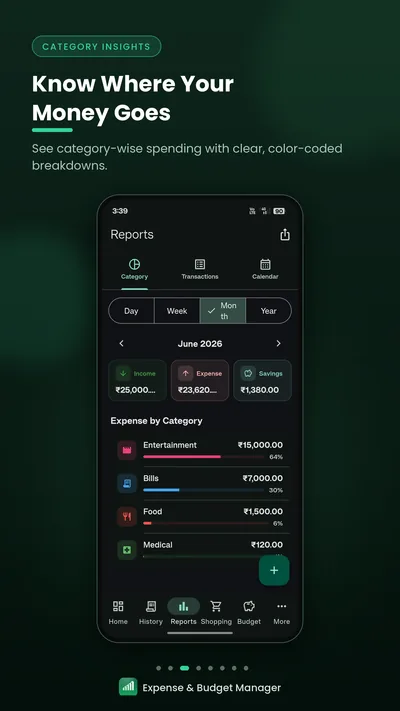
Understand your spending
- Day, week, month and year views
- Income, expense and savings totals
- Expenses by category with percentages
- Transactions and calendar tabs
- Export as PDF or CSV
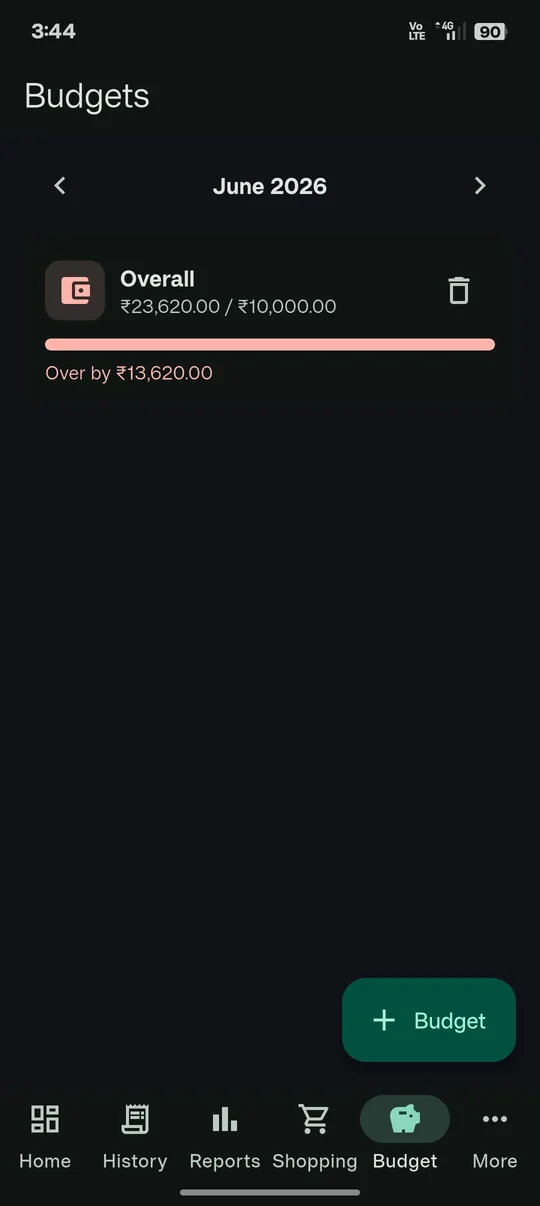
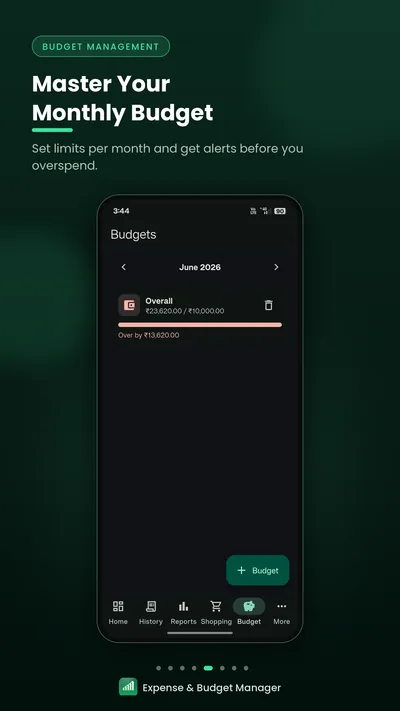
Plan your monthly budget
- Overall and per-category monthly budgets
- Spending compared with each limit
- What's left, or how much you're over
- Move between months to plan ahead
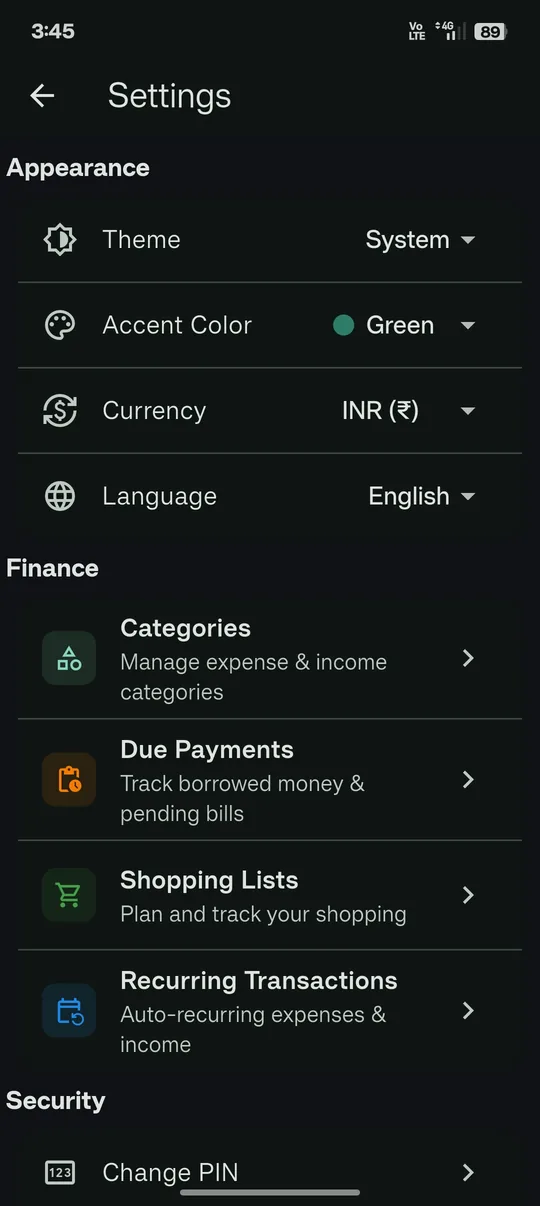
Make the app your own
- System, light or dark theme
- Green or orange accent color
- 7 currencies and 4 languages
- Categories, due payments, shopping lists and recurring entries
- PIN, biometric unlock and auto-lock
How it works
Track Expenses in Three Simple Steps
From your first entry to a clear view of your month.
-
Record
Tap + to add an expense or income. Enter the amount, choose a category and payment method, and save.
-
Organize
Keep entries tidy with categories, notes and tags, then search and filter your history whenever you need to.
-
Plan
Set monthly budgets, then use the dashboard and reports to see where your money goes.
Dashboard & reports
See Where Your Money Goes
Your expense dashboard brings the key numbers together, so you can review your monthly spending in one place.
-
Total balance
Your balance with income and expenses side by side, plus what you've saved this month.
-
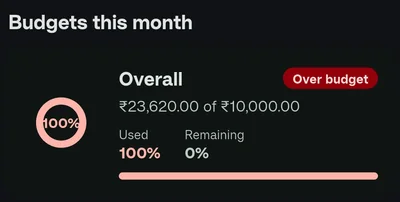
Budgets this month
How much of each budget is used and what remains, with a clear flag when you're near the limit or over.
-
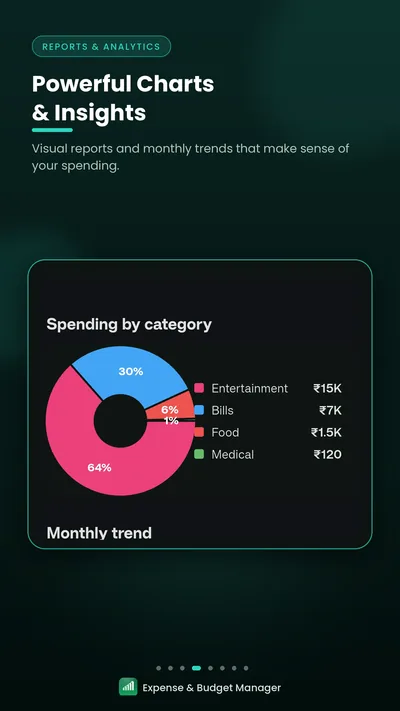
Spending by category
A color-coded chart shows which categories take the biggest share.
-
Monthly trend
A 12-month chart shows how your spending changes through the year.
-
Recent transactions
Your latest entries, with a shortcut to your full history.
Need more detail? Reports break your income and expenses down by day, week, month or year, and export to PDF or CSV.
Budget management
Plan Your Spending with a Monthly Budget Planner
Set a monthly budget for everything you spend or for individual categories, and see how your spending compares as the month goes on.
-
Overall or category-wise budgets
Create an overall monthly budget, budgets for specific categories, or both.
-
Progress you can read at a glance
See what you've spent against each limit, what's left, or how much you're over.
-
Month by month
Move between months to set budgets ahead of time or look back at earlier ones.
- Under 80% used
- 80% or more used Near limit
- Over the limit Over budget
The dashboard labels budgets that are near their limit or over budget.
Screenshots
Expense Tracker App Screenshots
Screenshots from the app's Google Play listing.
-
Expense tracking -
Category insights -
Reports & charts -
Budget management -
Transaction history -
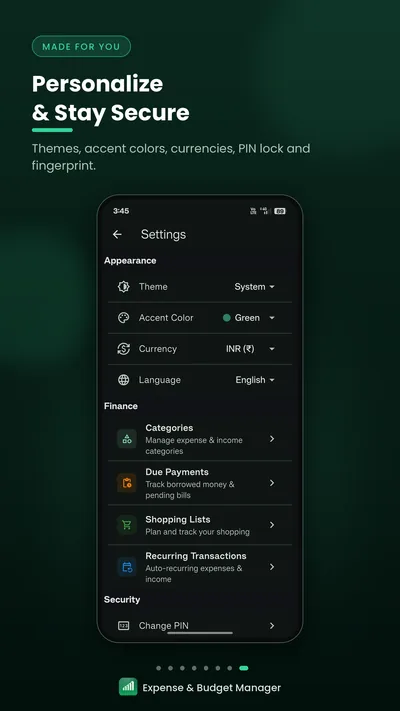
Personalize & secure
1 / 6
Privacy & security
Keep Your Expense Records Locked, Backed Up and Portable
Your expense history is personal. These built-in options let you decide how it's locked, backed up and exported.
-
App lock
Protect the app with a PIN and unlock with fingerprint or face on supported devices. Auto-lock can switch on after 30 seconds to 15 minutes of inactivity.
-
Stored on your device
Your transactions, budgets and categories are saved in the app on your phone.
-
Encrypted Google Drive backup
Back up to your own Google Drive manually or on a schedule. Backups are encrypted on your device before they're uploaded.
-
Export your data
Save expense reports as PDF or transactions as CSV to keep your own copies.
Make it yours
- Theme
- System Light Dark
- Accent color
- Green Orange
- Currency
- Indian rupee US dollar Euro British pound Japanese yen Australian dollar Canadian dollar
- Language
- English हिंदी ગુજરાતી मराठी
FAQ
Frequently Asked Questions
Quick answers about tracking expenses, planning budgets, reports, backups and privacy in Expense and Budget Management.
Expense and Budget Management is an expense tracker app and budget planner for Android, developed by Solution On It. It helps you record daily expenses and income, sort them into categories, set monthly budgets and see where your money goes with clear reports and charts.
Yes. The app is free to download and use, and it's supported by ads. You can get it on Google Play.
No. Expense and Budget Management is made for Android and is available on Google Play. There's no iPhone (iOS) version at the moment.
Yes. You sign up with your name, email and a password, then confirm your email with a verification code. You'll also set a 4-digit PIN that locks the app on your phone.
Tap the + button, choose Expense or Income, then enter the title, amount, date, category and payment method. Before saving, you can also add notes, tags, who you paid and a receipt.
Yes. Each transaction has a payment method – Cash, Card, UPI, Bank Transfer, Wallet or Other – so you can record how you paid and filter your history by it later.
No. You add your expenses and income yourself, so the app doesn't link to bank accounts or UPI apps and doesn't read your SMS messages.
Yes. When you add or edit a transaction, tap Attach on the Receipt / Invoice row to pick an image from your gallery, take a photo with your camera or import a PDF.
Yes. The app comes with 13 ready-made expense and income categories, such as Food, Bills, Travel and Salary, and you can add your own with a custom icon and color.
Create a recurring transaction with a daily, weekly, monthly or yearly schedule. Each time a payment falls due, the app adds it for you automatically the next time you open it.
Yes. Due Payments lets you record money you've borrowed, pending bills and IOUs with a total amount and an optional due date. You can log partial payments and see what's still remaining or overdue.
Open the Budget tab and tap + Budget to set an overall monthly limit or a budget for a single category. Each budget shows what you've spent and what's left, and you can switch months to plan ahead or look back.
A budget's progress bar turns amber once you've used 80% of it and red when you go over. The dashboard also labels those budgets Near limit or Over budget, so they're easy to spot.
The dashboard shows your total balance, this month's budgets, a spending-by-category chart, a 12-month spending trend and recent transactions. The Reports tab adds day, week, month and year views with income, expense and savings totals, a category breakdown and a calendar view.
Yes. In the Reports tab, tap the export icon to save the selected period as a PDF report or a CSV file you can open in a spreadsheet app.
You can show amounts in Indian rupees (₹, the default), US dollars, euros, British pounds, Japanese yen, Australian dollars or Canadian dollars. Switching currency changes the symbol, not your amounts. The app is available in English, Hindi, Gujarati and Marathi.
Yes. The app is protected by a 4-digit PIN, and you can turn on fingerprint or face unlock on supported devices. Auto-lock can lock it again after 30 seconds, or 1, 5 or 15 minutes, of inactivity.
Your transactions, budgets and categories are stored in the app on your phone, and your account details are kept on Solution On It's server so you can sign in. You can back up to your own Google Drive, manually or on a schedule, and restore it later; backups are encrypted on your device before upload. Read the Privacy Policy for full details.
Tap Forgot PIN on the lock screen, enter the email you registered with and type in the verification code sent to it, then choose a new PIN. Resetting your PIN doesn't delete your transactions.
Yes. In Settings, choose Delete Account Permanently to remove your account and all of its data, including transactions, budgets and categories. This can't be undone.

Start Managing Your Expenses Today
Keep track of your spending and stay organized with Expense and Budget Management, the free expense tracker and budget planner for Android.
Get it onGoogle Play
Company & developer
Developed by Solution On It
Expense and Budget Management is built and published by Solution On It.